Understanding KDC Components
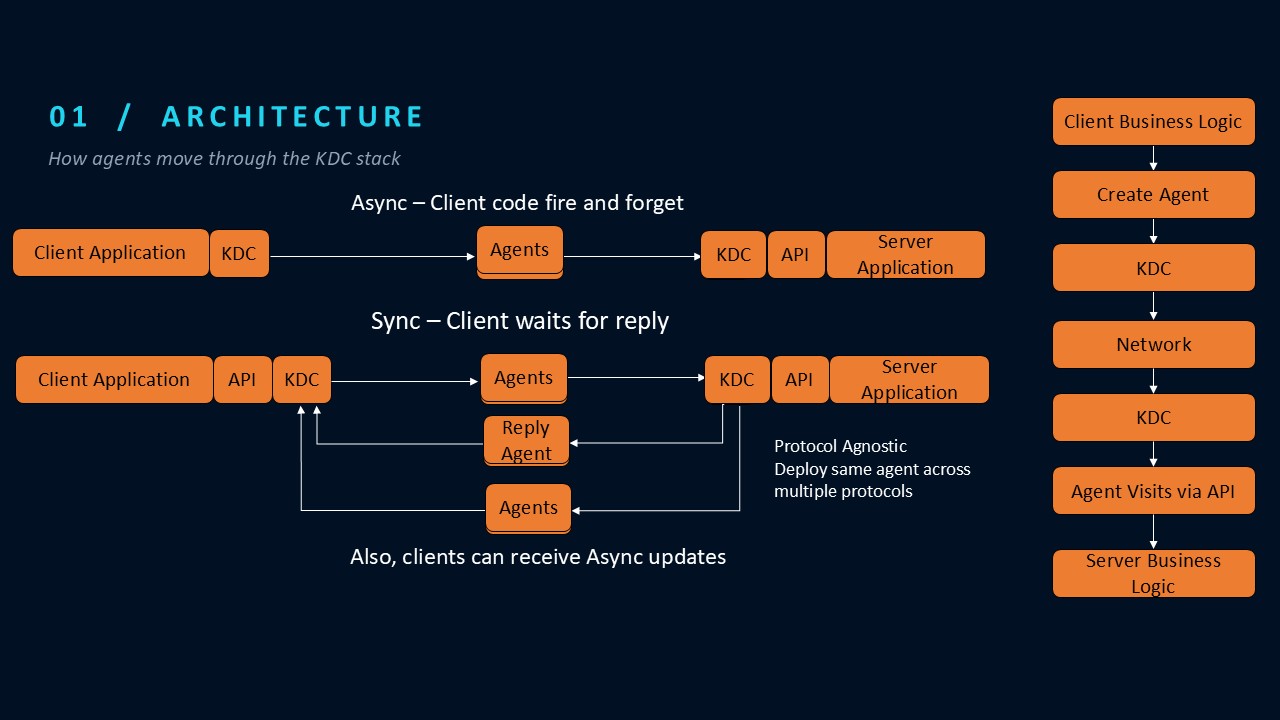
Kristen Data Comms (KDC) provides the infrastructure for distributed applications to communicate using executable software Agents. Agents encapsulate task logic and application data, allowing developers to focus on business logic rather than communication infrastructure.
KDC serializes and transmits an Agent’s state, then reconstructs it using a compatible Agent class already installed on the receiving system. KDC does not transmit executable class files or dynamically load arbitrary code from remote clients. This design prevents clients from introducing new executable code through Agent transmission, reducing the risk of malicious remote code execution. The Agent executes its task through a locally registered API implementation.
The following Java example demonstrates synchronous TCP communication, where a client sends an Agent to a remote server, the Agent invokes a server-side API, and the client receives a Reply containing the result.
Components Used in This Example
The following table identifies the application-defined and KDC-provided components used in this example. Click a KDC component name to view its Java API documentation.
| Component | Description |
|---|---|
| Application-Defined Components | |
| GreetingApi | Defines the greeting operation available to the Agent. |
| GreetingService | Implements the greeting operation on the server. |
| GreetingAgent | Defines the task sent to and executed on the server. |
| KDC-Provided Components | |
| API | Marker interface for application-defined APIs. |
| Agent | Base class for executable software Agents. |
| TcpServerParameters.Builder | Configures the TCP server and registers APIs. |
| TcpServer | Receives Agents and coordinates their execution. |
| TcpClientParameters.Builder | Configures the TCP client connection. |
| TcpClient | Sends Agents to the server. |
| Reply | Carries the result of a synchronous Agent operation. |
Complete TCP Example
1. Define the API and Service
KDC uses an application-defined API to expose operations that visiting Agents can invoke on the receiving system.
In this example, GreetingApi extends
KDC’s API marker interface and declares
a greet() method.
GreetingService implements that
interface and provides the greeting functionality.
Both classes are defined by the application developer.
Note: GreetingApi and GreetingService
are separate public Java types and should be defined
in their respective files:
GreetingApi.java and
GreetingService.java.
Both use the application’s package structure.
public interface GreetingApi extends API {
    String greet(String name);
}

public class GreetingService implements GreetingApi {

    @Override
    public String greet(String name) {
        System.out.println("Hello from " + name);
        return "Hello, " + name + "!";
    }
}
2. Define the Agent
The GreetingAgent extends KDC’s
Agent class and defines a
visit() method that receives the
server’s registered GreetingApi
implementation.
The Agent carries the greeting data, invokes the server-side API, and returns the result in a Reply.
The GreetingAgent class must be available
on both the client and server classpaths. KDC transmits
the Agent’s serialized state, not its compiled class
definition. On the server, KDC reconstructs the Agent
using the installed class and invokes its
visit() method with the registered
GreetingApi implementation.
public class GreetingAgent extends Agent {

    private String name;

    public GreetingAgent(String name) {
        this.name = name;
    }

    public Reply visit(GreetingApi api) {

        Reply reply = new Reply();
        reply.setData("message", api.greet(name));
        return reply;
    }
}
3. Configure and Start the TCP Server
The TcpServerParameters.Builder configures the server’s listening address, enables compression, and registers the application-defined GreetingService implementation.
KDC uses the registered service to supply the appropriate API implementation when an Agent is dispatched. The TcpServer starts automatically by default.
TcpServerParameters parameters =
        new TcpServerParameters.Builder()
                .withBindAddress("192.0.2.10", 5000)
                .withCompressed(true)
                .registerApi(GreetingApi.class, new GreetingService())
                .build();

TcpServer server =
        new TcpServer(parameters);
Configuration Notes:
The IP address 192.0.2.10 is reserved for
documentation and must be replaced with an address
assigned to the server. Port 5000 is the
TCP port on which the server listens.
KDC automatically starts the TCP server when it is
created because AUTOSTART is enabled by
default. Developers can disable automatic startup
through the server parameters when they need explicit
control over the server lifecycle.
4. Configure and Run the TCP Client
The TcpClientParameters.Builder configures the client’s network addresses and enables compression. The TcpClient manages communication with the remote server and starts automatically by default.
The client creates a GreetingAgent,
specifies its visit method and API using
setVisitMethod(), and sends it using
sendSync(). KDC executes the Agent on
the server and returns a Reply
containing the greeting result.
TcpClientParameters parameters =
        new TcpClientParameters.Builder()
                .withBindAddress("192.0.2.8", 5000)
                .withRemoteAddress("192.0.2.10", 5000)
                .withCompressed(true)
                .build();

TcpClient client =
        new TcpClient(parameters);

GreetingAgent agent =
        new GreetingAgent("World");

agent.setVisitMethod("visit", GreetingApi.class);

Reply reply = client.sendSync(agent);

System.out.println(
        reply.getData("message", String.class)
);
Configuration Notes:
The IP address 192.0.2.8 represents the
client’s local network interface, while
192.0.2.10 represents the remote TCP server.
Both are documentation addresses and must be replaced
with actual addresses assigned to the respective systems.
Port 5000 identifies the configured TCP port.
The client creates a GreetingAgent and uses
setVisitMethod() to identify the method
and API to invoke on the server. The
sendSync() operation sends the Agent and
waits for a Reply. The client then retrieves
the greeting message from the Reply’s data.
How It Works
-
The server registers a
GreetingServiceimplementation of theGreetingApiinterface. -
The client creates a
GreetingAgentand identifies itsvisit()method and corresponding API usingsetVisitMethod(). -
The client calls
sendSync()to send the Agent and wait for aReply. - KDC serializes the Agent’s state and transmits it to the server over TCP.
-
The server deserializes the Agent using
the compatible
GreetingAgentclass already installed on the server. -
KDC locates the registered
GreetingApiimplementation and supplies it to the Agent’svisit()method. -
The Agent invokes
greet()on the service and creates aReplycontaining the result. -
KDC transmits the
Replyback to the client, where the greeting message is retrieved and displayed.
Additional KDC Capabilities
This example demonstrates synchronous TCP communication, but Kristen Data Comms (KDC) supports a broader range of distributed application requirements.
- Synchronous and Asynchronous Communication: Send Agents and optionally wait for a Reply.
- Multiple Agent Operations: Agents can define multiple visit methods to perform different tasks using registered APIs.
- Multiple Network Protocols: Communicate using TCP, UDP, Multicast, HTTP, and WebSocket transports.
- Compression and Encryption: Configure compression and encryption to support application performance and security requirements.
- Cross-Language Communication: KDC provides Java, JavaScript, and Python implementations, with interoperability dependent on compatible serialization and Agent definitions. JavaScript and Python are currently client side only.
- Dependency Injection: Agents use APIs registered on the receiving system, separating task logic from local service implementations.
To learn more about how KDC compares with other communication technologies, visit our Technology Comparisons page.
For detailed information about KDC classes, interfaces, constructors, and methods, explore the KDC Java API Documentation.

